
Your team finishes good work, the customer says thank you, and everyone moves on to the next job. Weeks later, the review still has not appeared. The answer is usually a clearer process rather than a stronger sales pitch.
A useful review workflow makes it easy for customers to share their real experience. It should respect their choice, accept criticism, and give your team a repeatable way to follow up when work is complete.
1. Choose a clear point in the completion process
Decide when a review invitation fits naturally into your workflow. That might be the completion email or a follow-up after handover. Keep the request separate from unresolved issues that still require attention. Completing the job properly remains the priority, whether a review is posted or not.
Document the process so it does not depend on the owner remembering every evening. Decide who sends the invitation and where the team records that it was sent. For a small company, one item on a completion checklist may be enough.
Invite customers consistently rather than choosing only the people you expect to praise you. The process should welcome genuine feedback and should not make access to the public review link depend on giving a high score privately first.
2. Share one direct review link
Find the review link through your Business Profile and test it before sharing. A direct route is easier than asking someone to search for the company and work out where to click. Give the link a short explanation so its destination is clear.
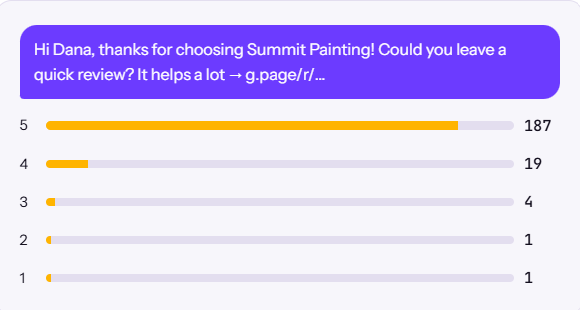
Here is a message you can adapt: “Thanks for choosing our team. If you would like to share your experience, you can leave an honest Google review here: [review link]. We appreciate your feedback.” Replace the placeholder with your real link before sending.
Do not ask the customer to include specific keywords, name a particular employee, or choose a particular rating. Their own account is the point. A prewritten testimonial is not a substitute for letting them describe the experience in their own words.
3. Keep participation optional
A review invitation should feel like a choice. Do not stand over someone while they write, make them explain why they declined, or tie any part of the service to posting feedback. The care they receive should not depend on reviewing the business.
Google prohibits incentives for reviews and selectively soliciting positive reviews. Do not offer payments, discounts, gifts, or similar rewards for a review or for changing one. Check Google’s contribution policy before setting up your workflow.
A private feedback channel can help resolve concerns, but it should not become a filter that sends only satisfied customers to Google. Make the public review option available consistently. Train anyone handling follow-up so they understand both the invitation and the limits.
4. Make any follow-up considerate
If an appropriate follow-up fits the communication permissions and preferences your business uses, keep it brief. Give customers an easy way to say that they would prefer no more messages. Do not move them into a new marketing campaign simply because they completed a job.
Treat a missing review as a choice, not a debt. People forget, dislike writing, or prefer to keep their experience private. Your responsibility is to make the option available, not to extract a response.
Keep your records simple enough to prevent accidental duplicate requests. A customer should not hear separately from the office, the technician, and an automated system about the same review. Good coordination protects the experience your team worked hard to create.
5. Reply with future readers in mind
Review replies are public. Keep them relevant, professional, and specific enough to show that you understood the feedback. You do not need to attach a sales pitch to every thank-you. Read the reply as a potential customer would before posting it.
For criticism, acknowledge the concern without exposing private job details. Invite the customer to continue the conversation through an appropriate contact route. Avoid public arguments about invoices, addresses, personal circumstances, or confidential discussions.
If a review appears to violate platform policies, use the reporting process. A negative opinion alone is not evidence of a policy violation. Keep useful records, but do not promise that a review can be removed or that reporting it guarantees a particular outcome.
6. Turn feedback into improvements
Look for recurring themes. Are customers praising clear updates, careful preparation, or tidy work? Are complaints pointing to missed arrival windows or unclear estimates? Give someone responsibility for the operational issue rather than only discussing the overall rating.
A short internal log can record the theme, proposed action, and person responsible. At the next review, check whether the change helped. This gives feedback a practical role in improving the business rather than reducing it to a marketing number.
When using testimonials on your website, represent them accurately and consider the permissions needed for additional uses or photographs. Put relevant proof alongside the service it supports. A review works best as evidence behind a clear explanation of your offer.
Build a repeatable, respectful routine
Start with one neutral message, one working link, and one consistent point in your workflow. Explain the process to the team, including what to avoid. Check the invitation occasionally so outdated links or duplicate messages do not undermine it.
Connect the work with your local search presence and the website enquiry journey. If you would like help reviewing the whole process, book an introductory call with The Largely.